
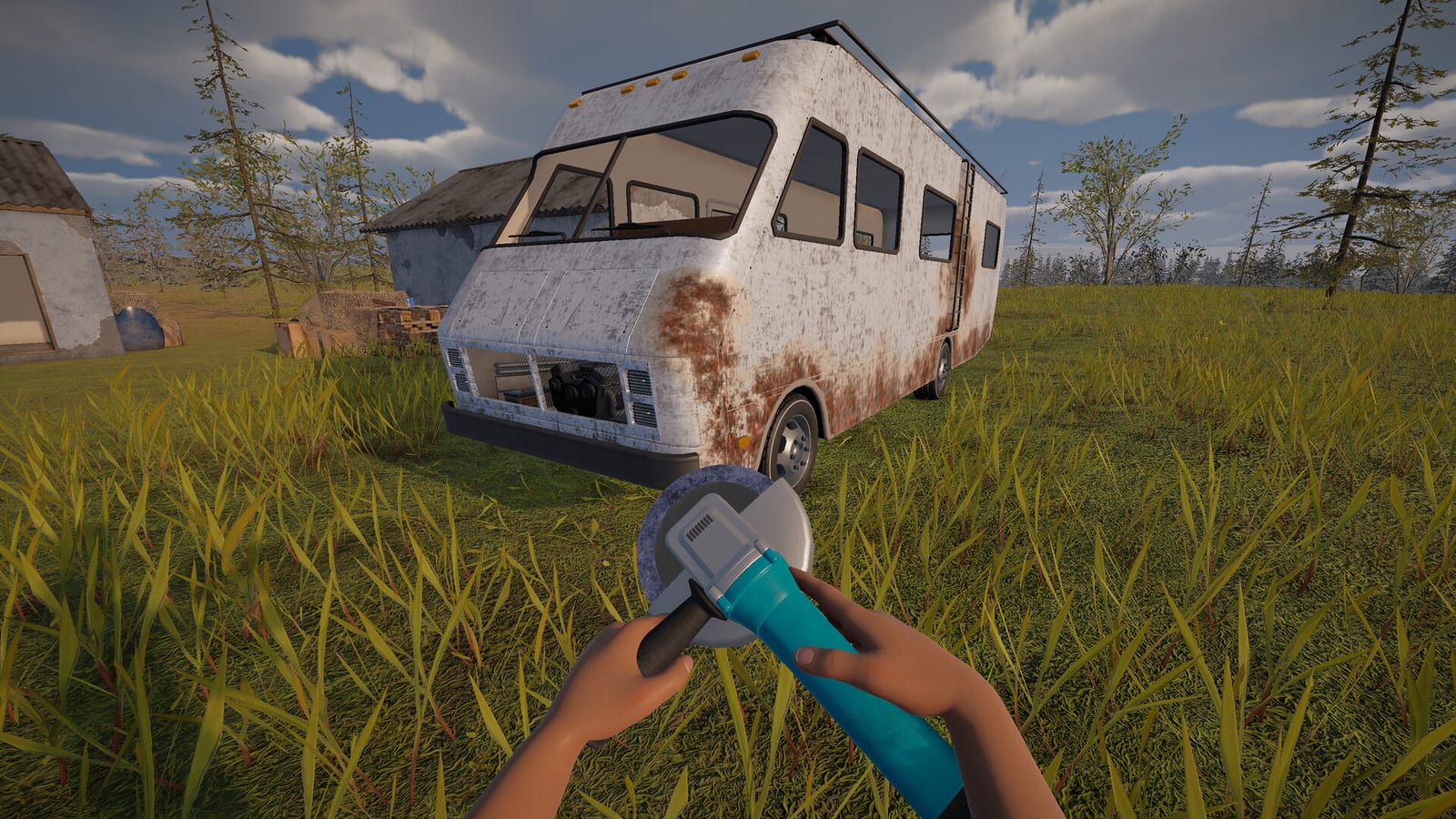
The vehicle list supported by the demo research
The safest answer to an all-cars search is a short list with its version clearly stated. The collected analysis of demo build 25361176 identifies two obtainable vehicles: the Hippie Van and C-Class RV. Official patches explicitly acknowledge the C-Class, while players independently describe finding and preparing a larger motorhome. This supports those two entries without inventing an expanded collection of cars.
The list is about usable vehicles, not every vehicle-shaped object or mechanical record. It does not include an engine as if it were a separate car, or a wreck as if it were an unlockable model. That distinction is particularly useful in a game where collecting vehicle parts and exploring roadside scenery happen together. A complete visual inventory of objects would answer a different question from which vehicles you can actually drive.
Start with the Hippie Van
The starter Hippie Van is the opening vehicle identified by the documented demo material. It belongs to the game’s repair-and-drive starting workflow rather than a separate buying or unlocking system. The opening guide describes assembling the starter vehicle and preparing its fuel and radiator water. Players can therefore work toward a functioning first ride before treating a larger RV as their next objective.
Knowing the starter vehicle’s role helps keep expectations realistic. You do not need an unverified showroom, price list, or hidden-car route to understand the opening progression. Concentrate first on the vehicle the objectives put in front of you and the faults it actually displays. Searching for another vehicle becomes a more deliberate choice once the starting transport and basic supplies are under control.
The C-Class RV is more than background scenery
The C-Class has direct developer support as part of the vehicle system. An official hotfix addresses a C-Class RV spawn bug, and a later stability update mentions RV handling and detail improvements. Those references establish that the larger motorhome is not simply a decorative shell inferred from a screenshot. Firsthand players also describe finding a larger RV and preparing it for use.
The evidence supports the vehicle’s existence more strongly than it supports any universal discovery route. A patch acknowledging a spawn bug does not say that every gas station now contains the vehicle. A player’s successful encounter does not make the same encounter inevitable in another world. Use the C-Class entry as a confirmed target to look for, while keeping its appearance at a particular stop conditional.
Where players have found larger RVs
The firsthand Steam discussion includes reports of larger-RV discoveries at roadside locations. The related demo analysis identifies gas stations, radio stations, and watch towers as candidate location types. These are useful categories to inspect during exploration rather than coordinates that reproduce the same result every time. The separate RV guide explains the search context in more detail.
Variation is visible even in the player reports themselves. Some players describe a successful find, while another reports a long search without one. This is why an all-cars page should not quietly turn a discovery anecdote into a guaranteed unlock condition. If a candidate stop contains no RV, that absence does not contradict the larger vehicle’s documented presence in the demo.
Separate a usable vehicle from derelict wreckage
The official desert diary describes derelict car wreckage as a point of interest. That wording establishes an exploration feature, not automatic drivability for each wrecked model. A recognizable body shape is therefore insufficient evidence for adding another name to the usable roster. The same caution applies to promotional scenes where a vehicle is visible but its interaction is not explained.
When exploring, inspect the object and the interactions your build actually offers. Do not plan a restoration project solely because the scenery resembles a real car. The collected research does not provide an official conversion rule that turns every wreck into working transport. Keeping scenery separate from confirmed vehicles prevents unnecessary searches for parts to fit an object that may only be part of the environment.
Inspect condition before changing vehicles
A vehicle’s presence is only the beginning of deciding whether to use it. Firsthand players describe moving equipment into larger RVs, but the research does not establish that every found RV has identical missing components. Examine the candidate’s condition and the relevant vehicle feedback before moving supplies from your current transport. The practical question is whether this particular RV can be prepared, not whether its name appears in a list.
Individual reports mention transfers involving wheels, seats, and an engine. They are evidence of what those players did, rather than a universal compatibility chart for every component. Check each part against the vehicle and current build instead of assuming that every item swaps freely. A short confirmed roster is most useful when it leads to that inspection, rather than implying that switching vehicles is always immediate.
A vehicle list and a parts list answer different questions
It is easy to read a long mechanical-equipment table and conclude that Nomad Drive contains an equally long list of drivable models. The research instead separates the obtainable vehicles from the parts used to prepare them. Engines, batteries, and repair kits describe the maintenance system, while the Hippie Van and C-Class name the supported demo vehicles. Keeping these categories apart gives a clearer answer than counting every mechanical item or unspawned record as another car.
The same separation helps when comparing two screenshots of what appears to be a different vehicle. A changed component, different condition, or altered living space is not enough on its own to establish an additional vanilla model. The research does not supply a verified cosmetic-variant catalogue, so it cannot settle every apparent visual difference as a separate roster entry. Use an explicitly identified vehicle in an appropriate build, supported by actual obtainability evidence, as the standard for expanding a practical drivable-car list rather than relying on the number of distinct-looking images.
Why this is not an Early Access master list
An October video can show a playtest even when its title uses the words full game. The research identified that exact mismatch in one walkthrough candidate, and it did not recover a transcript proving a wider public-demo roster. Recent footage should therefore not be combined with older demo data as if every vehicle belonged to one release. A title, screenshot, or update date cannot resolve that build difference by itself.
This roster reflects evidence checked on October 25, 2026. No verified top-speed table, engine-size comparison, mod-added vehicle list, or complete launch catalogue is supplied here. For the documented demo, the direct answer remains the starter Hippie Van and larger C-Class RV. Use official patch notes to track vehicle changes, and check a new model’s actual build context before treating it as an addition to the same list.